Originally published February 28, 2023. Updated July 30, 2026.
Watch: Convert PDF, InDesign & QuarkXPress Files on Windows
OmniMarkz SE for Windows lets you preview and convert PDF, InDesign, QuarkXPress, and Illustrator files without requiring the original application. This video demonstrates the Windows workflow and shows how to export documents into editable formats for continued use.
Get a quick overview of OmniMarkz SE, by watching this video, which shows some main features, so that you can get an idea of what this comprehensive file conversion application can do.
What the Video Demonstrates
• Preview PDF, InDesign, QuarkXPress, and Illustrator files on Windows.
• Review document content before conversion.
• Export selected files into editable formats for continued work.
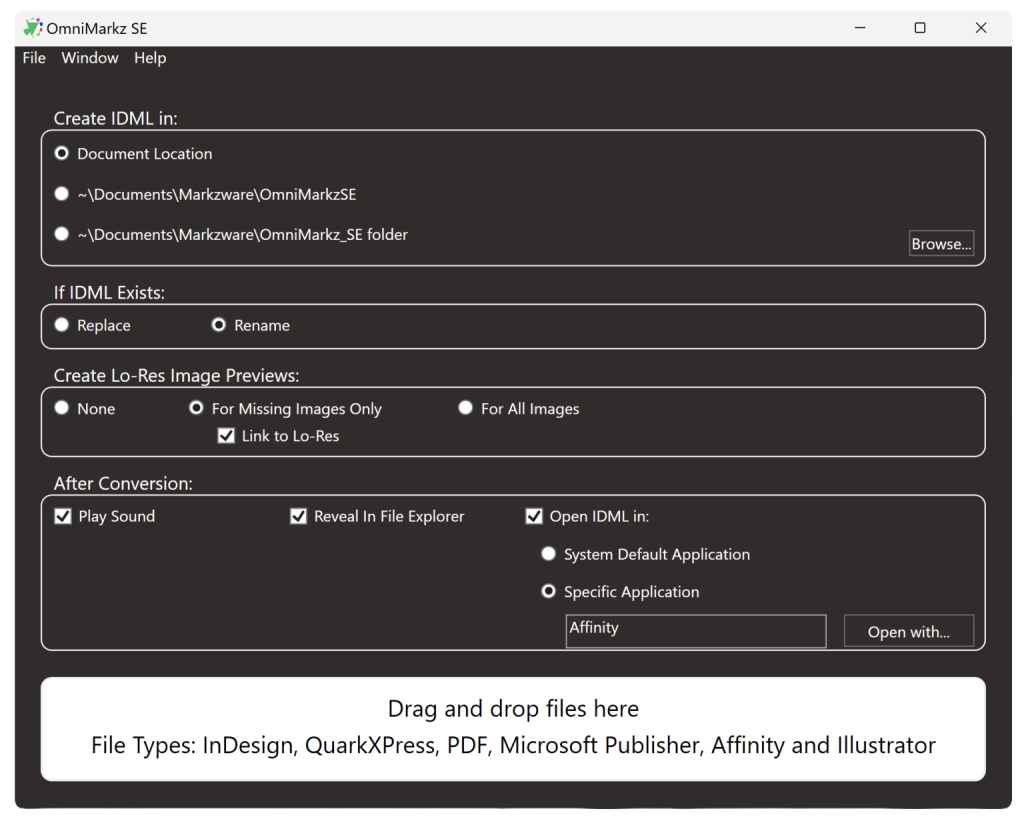
Instructions:
Convert Files on Windows with OmniMarkz SE
- Drag a supported file into OmniMarkz SE.
- Preview and review the document.
- Choose an export format or target application.
- Export the file and continue working in your selected application.
Convert Supported Files to IDML on Windows
OmniMarkz SE for Windows converts supported Microsoft Publisher, InDesign, QuarkXPress, PDF, Illustrator, and Affinity files to IDML for continued editing in compatible applications.
Preview the document, choose your conversion settings, and export it without needing the original application installed.
Export Supported Files to IDML on Windows
OmniMarkz SE converts supported Microsoft Publisher, InDesign, QuarkXPress, PDF, Illustrator, and Affinity files to IDML so you can continue editing in compatible applications.
Check out the Reviews and Tutorials
about OmniMarkz and OmniMarkz SE.
Convert Files with OmniMarkz SE
Related OmniMarkz Tutorials
OmniMarkz Quick Start
& General Overview
OmniMarkz Installation
and Activation
How to Export Images
from InDesign Documents
OmniMarkz Install and
Use Scripts in InDesign