
Originally published February 28, 2023. Updated July 30, 2026.
Video: OmniMarkz Quick Start Guide
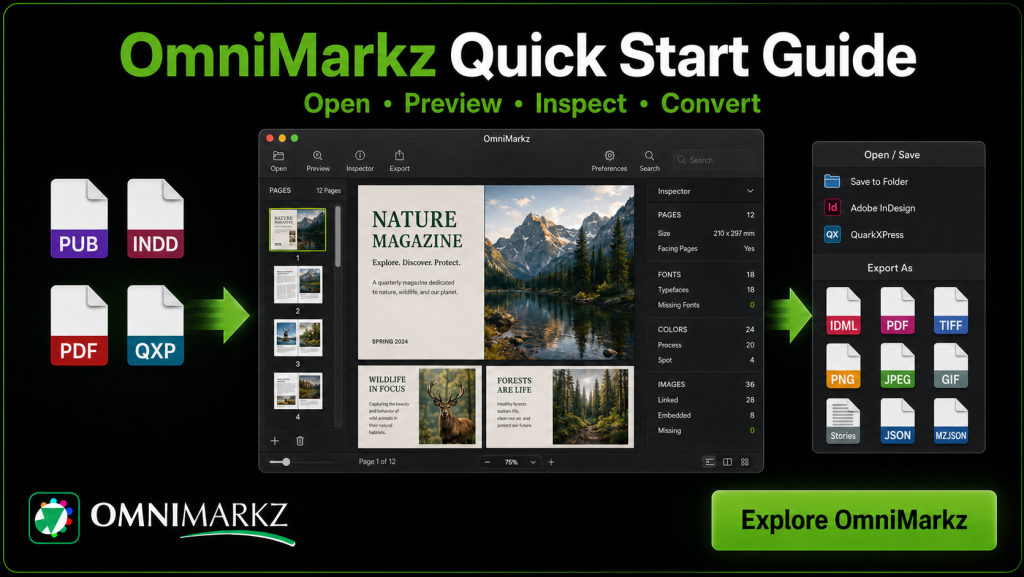
Get started with OmniMarkz for macOS. This overview demonstrates how to open and preview supported publishing files, inspect document details, navigate pages and export or open converted documents in other applications.
OmniMarkz Quick Start Steps
Download and install OmniMarkz
Download OmniMarkz for macOS, open the DMG installer and drag the OmniMarkz application into your Applications folder.
Need additional help? Follow the OmniMarkz installation and activation guide.
2. Open a publishing file
Launch OmniMarkz and press Command–O to select a supported file. You can also drag a file directly onto the OmniMarkz window.
3. Navigate the document preview
Use Command–+ to zoom in and Command–– to zoom out. Press Command–0 to return the preview to the full-page view.
4. Inspect document information
Use the Inspector panel to review information about pages, fonts, colors and images. Select an image entry to highlight it in the document preview and view additional image details.
5. Export the document
Select Export and choose the required output format. For example, selecting PNG exports the document as a series of PNG files, with one image created for each page.
6. Open the converted document
Select Open in InDesign to convert a supported document to IDML and open it in Adobe InDesign for editing.
Preview, Inventory and Convert Publishing Files
OmniMarkz is a stand-alone macOS application for previewing, inspecting, inventorying and converting Microsoft Publisher, Adobe InDesign, Illustrator, QuarkXPress, PDF, IDML and Affinity files.
Review document information—including pages, fonts, colors and images—without opening the original publishing application. The Conversion Center can also scan your Mac and create an inventory of supported files.
With a paid license, supported documents can be exported to IDML, PDF, JPEG, PNG, TIFF, GIF, TXT, RTF, JSON and HTML. Converted documents can also be opened in compatible applications such as Adobe InDesign, Affinity Publisher, QuarkXPress, Acrobat and Illustrator.
Start with OmniMarkz Free
Download OmniMarkz free to find, inventory and preview supported publishing files. Upgrade when you are ready to export or batch-convert documents.




