Markzware conducted and presents this file conversion case study, which demonstrates the positive effects of OmniMarkz (InDesign, PDF & QuarkXPress to IDML) on a publishing workflow. We tell you about the client, their objectives, challenges, solution, how it was implemented, the results, and the client’s next steps:
1. Client Description

Amybeth Menendez is a recognized Adobe Certified Instructor, Layout and Design Expert, Adobe Creative Educator, and Adobe Community Expert. She is also an Idealliance Certified Color Management Print Master, G7 Expert, content creator, and trainer.
Amybeth provides a variety of Adobe Application training, Workflow Color Management training, and Industry Best Practices training. She also provides application support for one of the Big Five Publishers. Her training provides creative inspiration and helps workflows to implement streamlined production.

Amybeth’s website at LearnAdobe123 provides foundational and advanced customized training on Photoshop, InDesign, Illustrator, Acrobat DC, Color Management, Design for Print, including logo design, photo retouching, and productivity methods. LearnAdobe123 offers courses that can help trainees to advance their skill levels and reach their creative goals.
Articles written by Amybeth Menendez include:
• Reducing Total Ink with Selective Color Adjustments in Photoshop
• How to Reduce Ink Density in Illustrator Files
• How to Work with PSB Files in InDesign
Amybeth had been using Markzware’s QXPMarkz (QuarkXPress to InDesign), PDFMarkz (PDF to InDesign) applications, and IDMarkz (InDesign to Affinity Publisher, QuarkXPress & More). She purchased a newer Markzware application, OmniMarkz (InDesign, PDF, & QuarkXPress to IDML), when it was released.
2. Objectives
File Access
During this case study, Amybeth revealed one of the ways she uses OmniMarkz is to basically recover bad files. Part of Amybeth’s job description is workflows. Sometimes, files had previously become corrupt, even when there was technically nothing inside that could be purged, to recover the file.
She says that, as a pre-press person, she technically wants to troubleshoot problematic documents and figure out the issue: “Sometimes, I mean, like I said, I really love to be able to figure it out and know the technical reason why something crashes.”

(Click on the image above, to watch the video.)
OmniMarkz can help users with crashing Adobe InDesign files
to be able to open those .indd files.
File Conversion
Amybeth receives Adobe InDesign, QuarkXPress, PDF, and other file types, throughout her work week. Depending on which format is used by a colleague, customer, or service provider, she needs to get the content from those files into the format used in the next step of the workflow.
Down-Saving
A document may be created in a newer version of a desktop publishing application. If Amybeth must provide the document in an older version of the same document format, she needs to down-save the document from the newer version to the older version.
Conversion Apps Management
Amybeth says one reason for the software upgrade was that she recently conducted a sweep of her computer Dock, as she had excess applications in her Dock. This prompted her to look up the definition of “omni,” which she found to be defined as “all-encompassing.”
OmniMarkz Preview Feature with Thumbnails of Facing Pages
File Preview for Layout Reviews
Amybeth needs to be able to preview files, to be able to quickly review documents for publishing. It is important for her to know about the fonts, images, text, and other layout elements contained in a document.

Export as Text
A text document may be requested by a client, vendor, or workflow member, so that they can review the text portion of the document, including text in a PNG or text in a GIF image. So, the workflow needed a tool that could perform text extraction.

OmniMarkz Toolbar with Export Feature

3. Challenges
Publishing Deadlines
In a publishing workflow, being productive and able to keep documents moving forward in the production process is critical. Amybeth describes this reality: “But, sometimes, there’s just no time. Sometimes, you need to put your cape on, right? And fix it, right away, because somebody’s waiting for it. There’s always a timeline. Things need to be done. That’s always like this has to be done by this time, like this step, and you need to hand it off to the next person.”

Different File Formats
Amybeth works for a large publisher that creates backlists in Adobe InDesign. QuarkXPress and InDesign files are consistently introduced into the workflow and these files must be opened and saved, during pre-press processes. For example, an InDesign 2024 user in the workflow may need to provide files to a colleague who is a QuarkXPress user.
OmniMarkz Opens QuarkXPress, PDF, and InDesign Files in Other Formats

Different Versions of the Same File Format
New software versions are constantly being developed and released, while users have older versions of the software being released. One user can have multiple versions of the same software, have multiple layout applications, be in a business that requires one layout application for branding consistency, etc.
Example: An Adobe InDesign CS6 user doesn’t have the latest version of InDesign for Creative Cloud. If a client submits a file that was created in the latest version, the CS6 user must down-save the file from the latest version to InDesign CS6, for editing. These situations can be challenging, as Amybeth notes:
And, then, here, this was the other day. It was time consuming. There was another person that I was working with that was troubleshooting this document. It’s an InDesign 2022 document that needed to be down-saved for an academic person that only had 2019. And, every time that we opened it, or exported an IDML, or saved as another InDesign, it just kept crashing in 2019.
– Amybeth Menendez, Adobe Certified Instructor + Color Management Print Master, LearnAdobe123

No Editable Document
Although Amybeth may have a PDF for a project, sometimes the document created in the original application is unavailable. If the content requires editing, she needs a tool that can export PDF content to a format in which she can edit.

Example of an older version of QuarkXPress
Legacy Files
Recently, her publishing workflow received very old Quark files with paragraphs that were not linked. The workflow needed to convert these files to Adobe InDesign files, which is the layout application format used by the business for production. In addition, the managing editor requested Word documents to enable the author to edit the document.
Amybeth comments on this obstacle: “So, here, I have some really old Quark documents. … I have a Quark 4 document and I don’t even know what it looks like.” She needs to be able to open legacy files like this, to be able to review or edit the content.
4. Solution
Solution for File Access
Amybeth says she uses Markzware’s stand-alone OmniMarkz application to export files to IDML, when she needs “to fix bad InDesign files”. She also uses OmniMarkz to access content in corrupt InDesign files:
So, OmniMarkz has saved the day, so many times. Just recently, I had a corrupt 2022 document that had to be accessed that wouldn’t open in 2022. The IDML just would not open up in any other application. It just kept crashing in any application. There was just no explanation for it. We would do a ‘Save as,’ … All the normal troubleshooting the file, right?
And, then, I just went to OmniMarkz, dropped the InDesign document, and it pointed it at a specific application that I wanted the document to open in. Because I had wanted to open it up in InDesign. And I knew that that designer was going to be working in InDesign 2019, and that InDesign document was created in InDesign 2019, and OmniMarkz saved the day. …
This is where you can set the Preferences, right? So, if you were trying to recover that document, like, sometimes, I do, you could choose to open in the application that the document was created in or a specific version of the document, right? Many different choices that you can choose. So, usually, if I do this, right? And, then, and there you go. There’s my IDML, because that’s what I had on.– Amybeth Menendez, Adobe Certified Instructor + Color Management Print Master, LearnAdobe123
Solution for File Conversion
OmniMarkz is a combination of PDFMarkz, QXPMarkz, and IDMarkz. It is a single solution to convert Adobe InDesign files, PDFs, and QuarkXPress files, all in one. OmniMarkz enables a variety of file conversions. You can also export reports, for sharing with other people.
With OmniMarkz, either user can drop their file onto the application’s interface, and the file can be converted to the other format. OmniMarkz allows QuarkXPress users to interact in an InDesign world and allows InDesign users to process QuarkXPress files. Amybeth adds, “ … I could export it, too. InDesign to Quark, to Publisher, to Acrobat, to Illustrator.”

OmniMarkz Preferences for Export to IDML,
Choose an Application in which to Always Open IDML in,
Reveal in Finder, and more
Solution for Down-Saving
In the Preferences of OmniMarkz, you can set it to open an InDesign file in specific versions of InDesign. You can set it to open a QuarkXPress file in a specific QuarkXPress version. If it’s a PDF file, you can set it to automatically open in different applications.
And, here, I could drop this in. I could point this to … I don’t have [InDesign 2019] on this computer. I have 2019 on my other computer, but we just pointed it to open in 2019, and the InDesign document just opened up, perfectly. And everybody was happy. And it just saved the day. But I just dropped it in. Yeah, I got everything and, then, I just exported the IDML. …
And, then, this is new, right? You could choose. It’s letting you know that you can choose the path that you want to save it to. So, you can choose. and it’s letting you know that you can choose a specific application.
You could show it in Finder, when it’s done. I always like to see it in Finder, because, usually, I’m doing this and, then, sending it to somebody, right? Or I’m going to double check it and make sure that it does open, before I send it to somebody. And you export …. I love to be able to be the hero, right? … I’m just saying, I mean, being that I’m on a workflows team.– Amybeth Menendez, Adobe Certified Instructor + Color Management Print Master, LearnAdobe123
Solution for Conversion Apps Management
After purchasing OmniMarkz, Amybeth was able to reduce the number of applications appearing in the Dock on her computer Desktop: “I still have it, but I was able to get rid of the Quark, the Quark to InDesign [QXPMarkz], and the InDesign Markz [IDMarkz], because OmniMarkz does everything, all in one” since OmniMarkz is able to handle file conversions for those applications.
Solution for File Preview
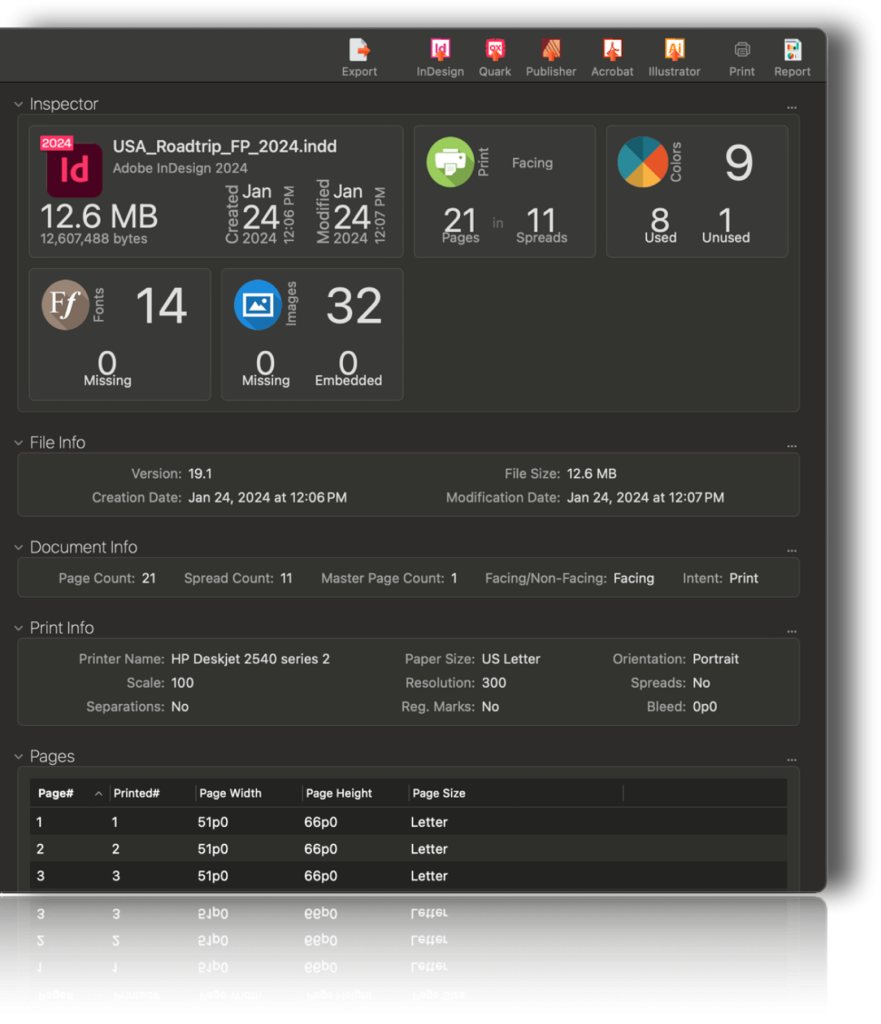
OmniMarkz can benefit those who use one or more of the supported file formats (QuarkXPress, Adobe InDesign, PDF, or Illustrator) for graphic design, printing, or publishing. After the user simply drops a file onto the application’s interface, OmniMarkz provides a document preview to check. It also provides an advanced file inventory of your .indd, .pdf, .qxp, or .ai document and will convert the document to many other formats.
The Inspector Feature in OmniMarkz Displays an
Advanced Inventory of Your .INDD, .PDF, .QXP, or .Ai Documents
Amybeth uses the Preview feature in OmniMarkz, to review documents and to see the fonts used in the documents, as displayed by the app. She observes, “ … they can get a preview of it. They know what they’re looking at. This is what I was trying to find, right? This is the right book that I was trying to find. And let me get this on to the right person, the right designer, right? So, that is perfect. So, I mean, there’s just so many uses for this.”
As soon as I drop it into OmniMarkz, I get a preview of what the document looks like. So, I can tell what it looks like, because who knows how long it’s been sitting in a data asset, file management, or whatever. And it gives me what fonts are used, how many images are used. You get a complete file inventory of it. I mean, it’s just … It’s phenomenal. It’s nice. …
So, all I need to do is just drop [the files] in. I get a beautiful preview. I get a preview of exactly what the book looks like. It’s telling me that it’s QuarkXPress 6. The date it was modified, the date it was created, how many fonts that it’s using. I could see how many colors are in the book, exactly which fonts are being used in the book, the images. So, if I have an image folder, which images, what the resolution of the images were. It’s just pretty phenomenal, the information that I could just get from this document.– Amybeth Menendez, Adobe Certified Instructor + Color Management Print Master, LearnAdobe123
Solution for File Conversion
A publishing customer may have CorelDRAW, Canva, Affinity Publisher, or Microsoft Publisher content that needs to be in an Adobe InDesign document, for creating a professional-looking book. An OmniMarkz user can have the customer save the document as a PDF, then use OmniMarkz to convert that PDF to InDesign.

And I have given you some of those files, as well. Instead of the PDFs. I’ve had a few of those coffee table art books … come into production that were created in Canva, unbelievably. Yeah, that had to be converted to InDesign files. And I used your software [OmniMarkz]. Yeah, from Canva. So, there you go. … There’s another perfect example of how that’s used, in the production world, in the print production market.
– Amybeth Menendez, Adobe Certified Instructor + Color Management Print Master, LearnAdobe123
An author may start a complex, multi-page design concept in Canva, but wants to ensure that the document will be produced as a professionally printed product. The author can export the Canva design as a PDF, use OmniMarkz to convert the PDF to InDesign, then hand it off to a graphic designer, who is an InDesign user that can professionalize it.
You have to embrace what people are using, especially when everybody’s home and everybody’s using these web-based applications, so … And the more educated you make people, the more they’ll know, right? So, it’s all about educating people, … And they’ll learn about InDesign … so they’ll know … and they’ll learn about … what they can do and what they can’t.
– Amybeth Menendez, Adobe Certified Instructor + Color Management Print Master, LearnAdobe123
Solution for PDF Editing
OmniMarkz is the effective solution to be able to edit content from a PDF, as Amybeth quickly discovered: “When I need to take a PDF and I don’t have an editable document that I need to export to InDesign or to Illustrator, or to get a document with text frames. And all of my fonts and imaging is exported by OmniMarkz.”
Solution for Export as Text
OmniMarkz allows users to export InDesign, PDF, Illustrator, Affinity Publisher, and QuarkXPress content to Text formats, including TXT, RTF, and HTML. Amybeth expresses appreciation for this feature:
OmniMarkz was able to, not only export the new version, but create new IDMLs. I think there were Quark documents that I needed to add emails, but they also were able to export .RTF files, Word documents, or Story documents that open perfectly in Word, of the entire book, so that the author or the managing editor was able to make the changes and, then, bring everything back into the InDesign. So, there’s so many uses for this application. It’s just I can go on and on.
– Amybeth Menendez, Adobe Certified Instructor + Color Management Print Master, LearnAdobe123
Editor’s clarification: OmniMarkz exports supported document text stories as RTF, TXT or HTML. RTF files can be opened in Microsoft Word and saved as DOCX. OmniMarkz does not directly create a complete Word document containing the original publishing layout and images.
5. Implementation
Amybeth purchased an OmniMarkz Subscription, downloaded the application, and quick started it. As a stand-alone application, OmniMarkz is very simple to integrate into a publishing workflow for graphic design, print, desktop publishing online, etc. By launching the app, Amybeth now has access to all of the valuable preview, file conversion, open, export, automation, and other features and options that this Markzware application offers.

6. Results
Cost Savings
Amybeth says OmniMarkz is more cost effective, as well as more manageable, since she is now able to use one multi-functional tool to accomplish all of her workflow’s file conversion needs. It allows her to have a single solution to convert the variety of files that her workflow processes.
Purchasing one OmniMarkz Subscription is less expensive than purchasing the three different software applications (PDFMarkz, QXPMarkz, and IDMarkz). Amybeth expressed that the OmniMarkz purchase saves money for her company.
It’s all encompassing, right? I mean, it’s really fantastic! And I do not get any commission for plugging this software. I can’t express how many times this has just helped the productivity of my workflow, extremely. That’s all I can say about it. It’s just a time-saving, productivity-saving, amazing tool to have, if you’re in pre-press, if you’re in workflow, if you’re a designer. There are so many people that benefit from this.
– Amybeth Menendez, Adobe Certified Instructor + Color Management Print Master, LearnAdobe123
Time Savings
Due to production deadlines for publishing, Amybeth needs to quickly access documents, so that she can pass the document to the next workflow member. When her workflow needed to convert a large legacy QuarkXPress file to IDML and export its text as RTF for editing in Microsoft Word, she was able to save hours and considerable effort.
So, even if they were able to go into the original documents, they would have had to copy and paste 272 pages from page to page into a Word document, so that the author and the managing editor could make these tech changes for the new publication. That would have taken forever.
– Amybeth Menendez, Adobe Certified Instructor + Color Management Print Master, LearnAdobe123
Automatic Increase in Productivity
OmniMarkz offers intelligent Automation options, so that users can easily configure Automation Preferences. OmniMarkz will automatically export and open the file in your chosen application. Double click an INDD, QXP, or PDF file in Finder and the document will convert and open in QuarkXPress, Affinity Publisher, InDesign, or another application of your choice.
OmniMarkz Automation Interface to
Automatically Open & Export Files (Dark Mode)

And my favorite thing is going into the Preferences, right? And setting. So, for Automation, I think I only have IDML, at this point, but usually, I have IDML and .RTF, like a Story, a Word document. You can use it just to automatically open, relative to the path. So, every time you drop a document in, I could say, “Export to IDML.” I could say, “Export to a Story.”
I could choose a Text document, which will open perfectly in Word, for you. It automatically creates it in a beautiful folder, for me. So, now, if I drop the next one in, it should create a Story, at the same time. Because I have that … And look at that! It’s got all these different things that I have. I mean, I love it! This is perfect! I can see everything. I mean, how perfect is this for somebody that doesn’t even have those applications on their computer?– Amybeth Menendez, Adobe Certified Instructor + Color Management Print Master, LearnAdobe123
7. Reasons for Success
Amybeth Menendez says, “ … it’s always good to have a reliable application that can convert your files and give you a good output.” When asked if she would be inclined to recommend OmniMarkz, Amybeth responded:
I’m a complete fan, as a customer of OmniMarkz. I’m a consumer. I pay for OmniMarkz. It does nothing but increase my productivity. And it is beneficial to my workflow. I could not see not having it as part of the integration of my workflow, because it saves the day. So, yes, I would, absolutely! I give it five stars. One, two, three, four, five stars. And I would absolutely recommend it to anybody that’s a designer, anybody that’s in prepress, anybody that needs to convert files, especially in today’s world. …. So, I say yes.
– Amybeth Menendez, Adobe Certified Instructor + Color Management Print Master, LearnAdobe123
8. Next Steps
Amybeth plans to continue to use OmniMarkz to assist with file conversion, file access, and take advantage of many usages provided by this beneficial file conversion software. LearnAdobe123 can use OmniMarkz to process documents in preparation for an upcoming industry event:
Graphic Communications Scholarship Foundation will host the Adobe Educational Series, Wednesday, January 15, 2025, 7:00 PM to 8:30 PM. Adobe Certified Instructor & Expert, Amybeth Menendez, dives into the newest Photoshop, Illustrator, and other Adobe Creative Cloud applications, during three informative sessions sure to mention tips and tools for print production and more.
Class Session One, Photoshop Focused AI, Adobe Firefly will cover:
• Adjustment Presets
• Adobe Express
• Applying artistic styles with Generative AI
• Generative Credits? Questions and Answers
• Generative Expand
• Generative Fill
• Inpainting
• The new Adjustment BRUSH
• New Feature Overview!
• Opacity fills with AI
• Parametric Filters and more!
• Photoshop on the web
• Remove Distractions
• What’s Adobe Firefly Model 2?
• And more!
Share This Article with Your Contacts
We hope you found our article on a case study about file conversion for publishing to be helpful. If you think your colleagues or industry contacts would benefit from this information, we’d be grateful if you could forward it to them or share it on social media. Thank you for your support in helping us spread valuable insights within our industry. Here is the link to share:
https://markzware.com/omnimarkz/indesign-pdf-quarkxpress-converter-publishing-omnimarkz-learnadobe123-markzware-case-study/

About OmniMarkz
With Markzware’s OmniMarkz file conversion application, users can:
• Open InDesign, QuarkXPress & PDF files in InDesign, Acrobat, Illustrator, QuarkXPress, Affinity Publisher & more.
• Preview InDesign, Illustrator, QuarkXPress, and PDF Documents
• View a Document Inventory of Your File
• Export InDesign, QuarkXPress, & PDF Files as IDML, PDF, JPEG, PNG, TIFF, GIF, TXT, RTF, & HTML.
• Extract Styled Text Stories
• Integrate with Automated Workflows
• Use Scripts to Integrate with InDesign Workflows
• And more
OmniMarkz Scripts Feature for InDesign Workflows


PDF & DTP Software For Creatives & Content Creators
Markzware offers software for publishers and other document creators to preview, preflight, export, and convert PDF and desktop publishing documents. Become a Markzware Reseller or Markzware Affiliate.

Looking for the Current OmniMarkz?
This 2021 announcement contains historical OmniMarkz pricing, system requirements and promotional information. Visit the current OmniMarkz product page for the latest features, compatibility, free download and licensing options.
To get the latest news about Markzware products and print industry-related news, join our mailing list. You can also follow Markzware on X, LinkedIn, YouTube, Facebook, and other social media websites.
InDesign, PDF & QuarkXPress Converter for Publishing: OmniMarkz at LearnAdobe123 (Markzware Case Study)