Professional Publishing Document Intelligence™: Talk to Your Publishing Files with OmniMarkz MCP
Updated October 23, 2026
Native publishing files contain far more than words on a page. A Microsoft Publisher, Adobe InDesign, QuarkXPress or PDF document can include page geometry, fonts, colors, linked and embedded images, stories, metadata and other structural information. This rich document structure is the foundation of what Markzware calls Professional Publishing Document Intelligence™—the ability to understand, inspect, convert, and reuse complex publishing documents with high fidelity.
Why Professional Publishing Document Intelligence™ Matters
OmniMarkz MCP is one part of Markzware’s broader vision for Professional Publishing Document Intelligence™. Instead of treating publishing files as static documents, OmniMarkz understands their structure, relationships, and conversion possibilities, making that intelligence available through AI-powered workflows.
Professional Publishing Document Intelligence™ in OmniMarkz 2026
OmniMarkz 2026 brings together three complementary capabilities that form the foundation of Professional Publishing Document Intelligence™:
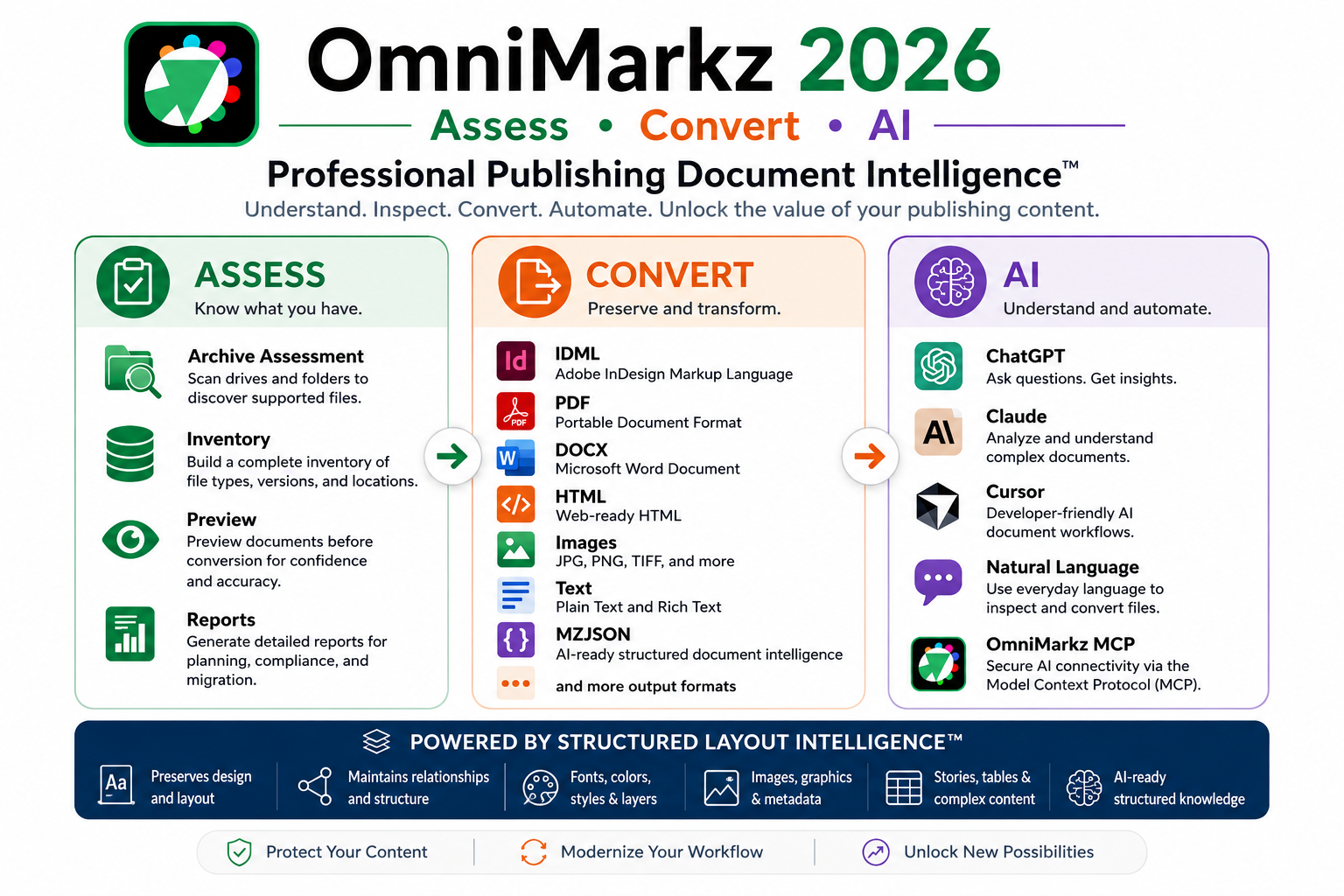
Together, these three capabilities enable organizations to assess publishing archives, preserve structured publishing knowledge, convert documents with high fidelity, and connect compatible AI assistants through natural-language workflows.
Conversion Center
Assess and understand publishing archives through Archive Assessment, inventory, preview, reporting, and batch conversion.
MZJSON Back to contents ↑
Preserve the intelligence of complex publishing documents in an AI-ready structured representation that retains pages, stories, typography, graphics, styles, colors, layers, and layout relationships.
OmniMarkz MCP Back to contents ↑
Connect compatible AI assistants to that structured publishing knowledge through natural-language requests, enabling AI-powered inspection, analysis, reporting, translation, and document conversion.
Together, these capabilities help organizations assess, convert, and use AI to unlock decades of publishing knowledge.
OmniMarkz MCP creates a more direct workflow. It connects Markzware’s publishing-file intelligence with compatible desktop AI applications through the Model Context Protocol, or MCP. Rather than asking a general-purpose AI service to interpret a native publishing file on its own, the AI assistant can call OmniMarkz tools to inspect supported files and request supported actions using natural language.
Professional Publishing Document Intelligence™ is built on three complementary capabilities:
Assess your publishing archive.
Convert documents with high fidelity.
Use AI to inspect, understand, and automate publishing workflows.
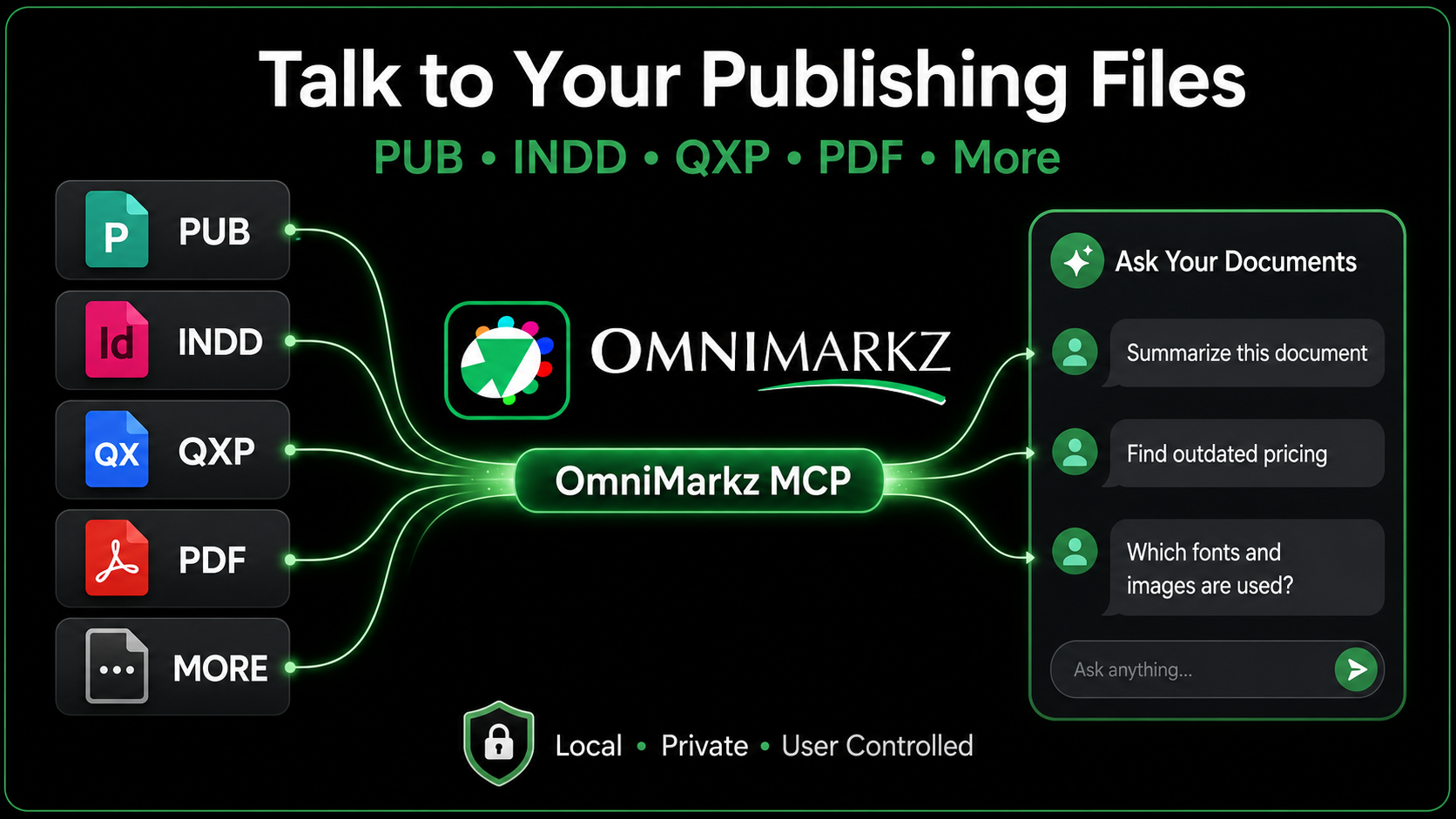
Concept illustration: OmniMarkz MCP connects supported publishing files with compatible AI assistants.
Examples include:
- Summarize this document.
- Which fonts and images are used?
- Are any assets missing?
- Find pricing or other content that may be outdated.
- Inspect the document before I convert it.
- Convert this file to a supported output format.
In plain language, OmniMarkz helps the AI assistant understand the publishing file and gives the user a conversational way to work with that information.
What Does “Talk to Your Publishing Files” Mean? Back to contents ↑
Ordinary AI document chat works best with file types the service already knows how to read. Native desktop-publishing formats are different. Their content and layout may be locked inside proprietary structures that a general-purpose assistant cannot reliably interpret on its own.
OmniMarkz acts as the publishing-file specialist between the document and the AI assistant. It reads supported files locally, extracts useful document intelligence and exposes supported tools through MCP. The assistant can then use those tools when responding to the user’s request.
This does not mean the file is literally having a conversation. It means the user can interact with the document’s content, structure and available conversion functions using everyday language instead of navigating every command manually.
What Is MCP? Back to contents ↑
The Model Context Protocol is an open standard for connecting AI applications with external data sources and tools. It gives a compatible AI client a consistent way to discover what a connected application can do and to request those actions with the user’s approval.
For OmniMarkz, MCP provides the bridge between a compatible AI assistant and Markzware’s document-inspection and conversion technology. OmniMarkz remains responsible for understanding the publishing file; the AI assistant provides the conversational interface.
Learn more from the official Model Context Protocol introduction.
How OmniMarkz MCP Works Back to contents ↑
The workflow has four basic parts:
- Choose a supported publishing file. This may include a Microsoft Publisher, Adobe InDesign, QuarkXPress, PDF or another format supported by the installed OmniMarkz version.
- OmniMarkz interprets the file. It previews and inspects the document and makes supported information or conversion actions available.
- MCP provides a controlled connection. The compatible desktop AI application discovers the tools OmniMarkz exposes.
- Ask the AI assistant. The user asks a question or requests an action, reviews the response and remains in control of the workflow.
The result is a conversational interface to publishing-file intelligence that would otherwise require specialized software knowledge or a series of manual steps.
For example, a user might ask:
Use OmniMarkz MCP to open this publishing document, report the number of pages, stories, images and fonts, and then convert it to a supported output format.
A single natural-language request can combine document inspection with a supported conversion action. The exact information and available outputs depend on the file, the installed OmniMarkz version and the tools available to the connected AI application.
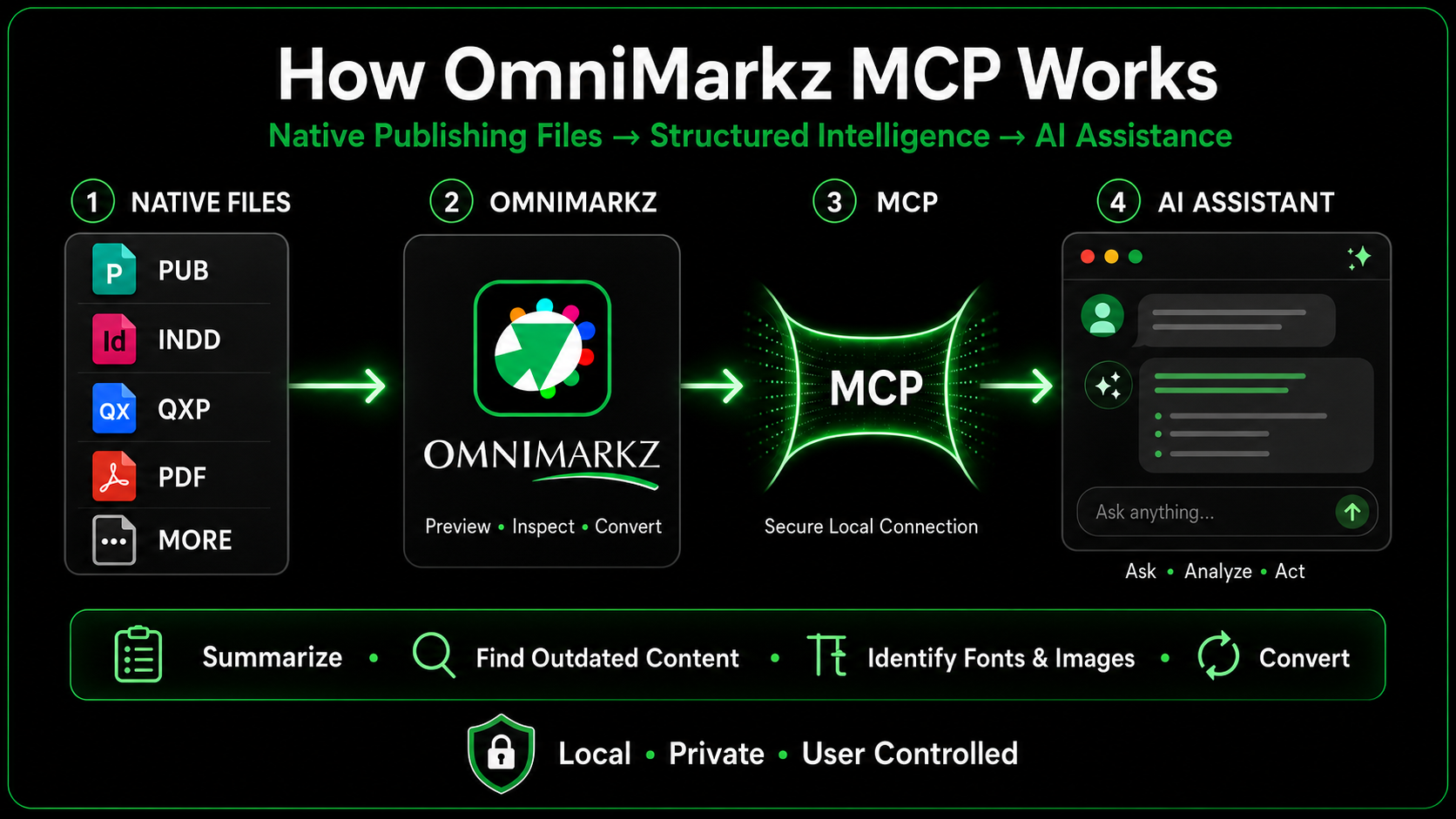
How OmniMarkz MCP connects supported publishing files with compatible AI applications.
MZJSON: The Foundation of Professional Publishing Document Intelligence™ Back to contents ↑
JSON provides a predictable way for software and AI systems to exchange structured information. However, JSON alone does not explain what a publishing document means. The schema and the quality of the source-file interpretation determine whether an AI assistant receives a loose collection of text or an organized representation of the original publication.
MZJSON is the structured document foundation that enables Professional Publishing Document Intelligence™. It organizes publishing-specific information into an AI-ready representation that can preserve meaningful document relationships beyond plain text.
MZJSON is Markzware’s structured, page-aware representation of a document. It can preserve information about pages, stories, frames, geometry, styles, fonts, images, reading order, metadata and relationships. Instead of providing only flattened pixels or extracted text, MZJSON gives the connected AI assistant access to organized publishing-document intelligence.
Each part of the workflow has a distinct role: OmniMarkz interprets the publishing file, MZJSON organizes the document intelligence, and MCP makes supported information and actions accessible to a compatible AI assistant. This can reduce how much the AI must infer about the document’s original structure.
Beyond Ordinary AI Document Chat Back to contents ↑
Uploading a PDF or text document to an AI service is useful for summarization, but it is not the same as interpreting native publishing files. General document-chat tools may see extracted text while missing the original application’s document structure, linked assets, font usage and conversion possibilities.
OmniMarkz MCP is designed to add that publishing-specific layer. That publishing-specific understanding is what Markzware refers to as Professional Publishing Document Intelligence™. It can help the assistant work with information that OmniMarkz understands about the native document and, where supported, initiate an OmniMarkz conversion workflow.
The distinction is important:
- Ordinary document chat: The AI reads a supported upload or extracted text.
- OmniMarkz MCP: The AI calls tools supplied by OmniMarkz to inspect or act on supported publishing files.
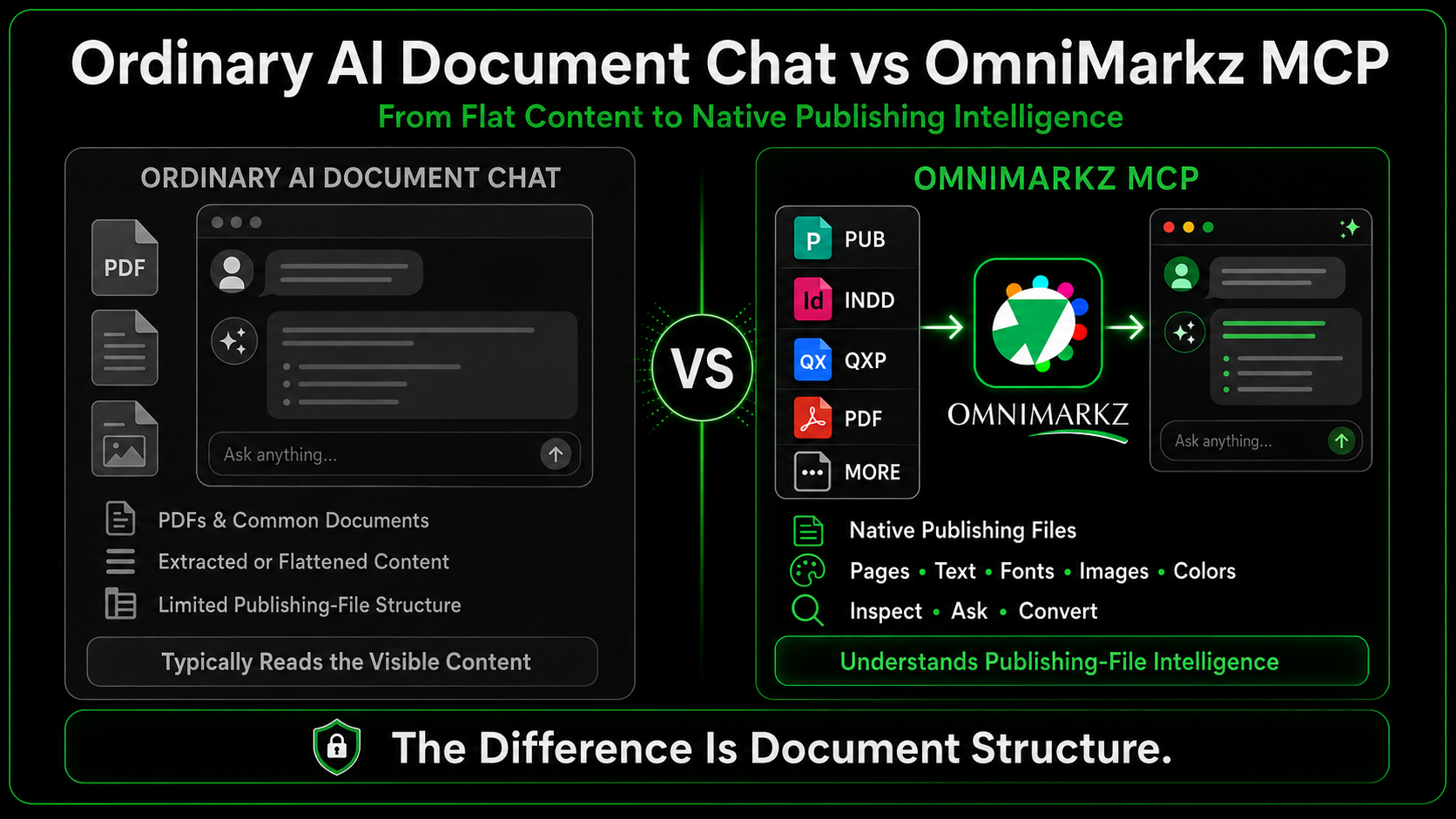
Ordinary AI document chat compared with OmniMarkz publishing-file intelligence.
What Makes OmniMarkz MCP Different? Back to contents ↑
Based on publicly available products reviewed as of August 1, 2026, OmniMarkz appears differentiated by combining a built-in MCP connection with host-application-independent inspection and conversion of multiple native publishing formats, including Microsoft Publisher, Adobe InDesign, QuarkXPress and PDF, in one desktop application.
Other MCP-related publishing tools exist. For example, Sidekick for Adobe InDesign and Duet for Adobe InDesign connect AI-assisted workflows with InDesign. That is a different approach from OmniMarkz, which is a standalone application and does not require the original authoring application merely to inspect supported files.
The practical distinction is this: OmniMarkz brings MCP access to Markzware’s distinctive, host-application-independent publishing-file interpretation and conversion technology.
Rather than simply connecting AI to documents, OmniMarkz connects AI to Professional Publishing Document Intelligence™, giving compatible assistants access to structured publishing knowledge instead of flattened content.
What Can You Ask Your Publishing Files? Back to contents ↑
The exact answers and actions depend on the file, the installed OmniMarkz version and the tools exposed to the connected AI client. Potential workflows include:
Summarize and inspect Back to contents ↑
Ask for a high-level summary, document inventory or explanation of the file’s contents before opening or converting it.
Identify fonts, colors and images Back to contents ↑
Review information about fonts, color usage, linked or embedded images and other document resources. This can help with archiving, preflight preparation and asset recovery.
Find content that needs attention Back to contents ↑
Ask the assistant to locate pricing, dates, product names, contact information or other content that may need review. A human should verify every finding before publication.
Prepare a conversion Back to contents ↑
Ask about available export paths or initiate a supported conversion. OmniMarkz performs the actual file interpretation and conversion; the AI assistant helps the user request and understand the operation.
Investigate legacy files Back to contents ↑
Use OmniMarkz to inspect older Publisher, InDesign or QuarkXPress files without first locating the original authoring environment. This is especially relevant now that Microsoft Publisher retired from Microsoft 365 on October 1, 2026.
Useful Workflows for Publishing Teams Back to contents ↑
OmniMarkz MCP may help creative teams, printers, archives, agencies and in-house production departments:
- Inventory folders of legacy publishing files.
- Review documents before deciding which ones to preserve or convert.
- Identify fonts and image assets needed for a migration.
- Locate outdated content across supported documents.
- Explain unfamiliar files to non-design staff.
- Prepare files for reuse in modern publishing workflows.
- Reduce the number of manual steps required to inspect and convert documents.
REUSE YOUR CONTENT ONLINE
Bring Publishing Content to WordPress Back to contents ↑
Use the Design File to WordPress skill with OmniMarkz and a compatible AI agent to turn content from supported Publisher, InDesign, QuarkXPress, and PDF documents into editable WordPress drafts—with headings, paragraphs, and available images ready for review.
Follow the setup guide, connect your WordPress site, and try a sample publication. Review reading order, images, fonts, and layout before publishing; complex print designs may need adjustment for the web.
Creates drafts for review. Nothing is published automatically. The guide also covers InDesign, QuarkXPress, and PDF workflows.
From File Discovery to AI-Assisted Reuse Back to contents ↑
Together, Conversion Center, MZJSON, and the OmniMarkz MCP Server form the core of Markzware’s Professional Publishing Document Intelligence™ platform, helping organizations assess, understand, convert, and reuse publishing archives:
- Find and inventory the files. Use Conversion Center to locate supported publishing documents and understand the size of the archive.
- Understand them with AI. Use OmniMarkz MCP to ask questions about document content, structure, fonts, images and available conversion paths.
- Convert and reuse the content. Use OmniMarkz to move selected files into supported modern workflows.
MZJSON can also provide structured, page-aware content for downstream AI-assisted translation and reuse workflows. OmniMarkz supplies the document structure and conversion technology; the connected AI service performs the AI-assisted translation or analysis.
For related background, see:
- How to Extract Text and Images from PDF and DTP Files
- Microsoft Publisher End of Life Is a Digital Preservation Problem
- Inventory Microsoft Publisher Files with OmniMarkz
- Microsoft Publisher End of Life: Better Conversion Options
Local Connection and Data Privacy Back to contents ↑
The OmniMarkz MCP helper and source-file access run on the user’s Mac. Users can control which local locations are available to the MCP connection by configuring allowed roots.
However, “local connection” does not automatically mean that every part of every AI interaction remains on the computer. The connected AI application’s own data-handling and privacy policies apply to any information shared with that service. Organizations should review those policies, choose appropriate files and configure access controls before using confidential material.
A precise public statement is: OmniMarkz accesses source files locally, while the data-handling policies of the connected AI application apply to information shared with that service.
Compatible AI Applications Back to contents ↑
The current OmniMarkz MCP settings interface provides local installation support for compatible desktop clients such as ChatGPT Desktop, Claude Desktop and Cursor. Availability and setup may change as these applications update their MCP support.
The settings panel shows installation status, configuration options and access-control helpers. After installing or updating the MCP connection, restart the selected desktop AI application before testing it.
ChatGPT on the web is not configured through the same one-click local desktop setup shown here. Any future web or secure-tunnel workflow would require separate setup guidance.
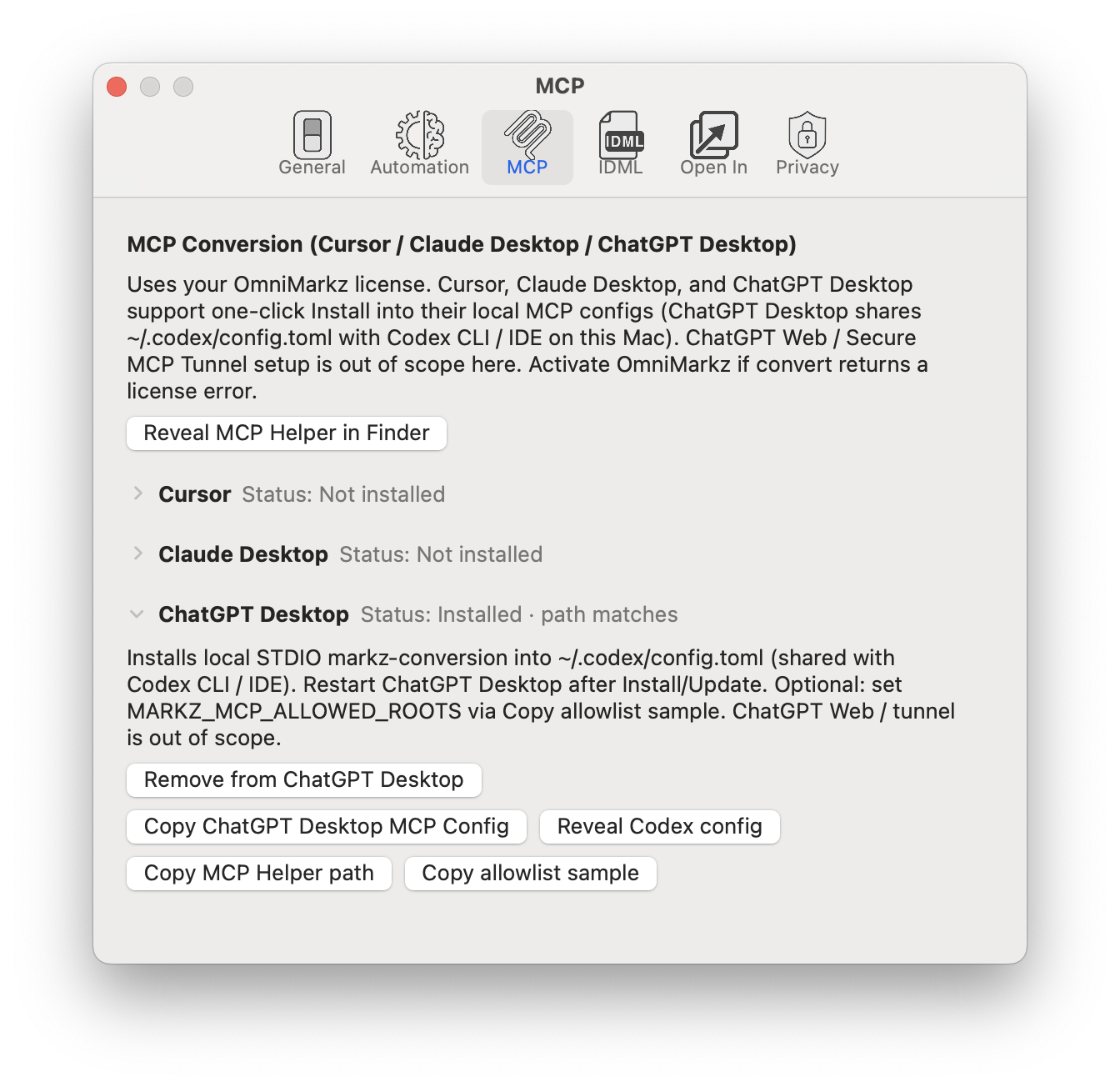
OmniMarkz MCP settings showing ChatGPT Desktop installation and local configuration options.
Ready to connect an AI assistant? Follow the How to Use OmniMarkz MCP for AI Document Conversion tutorial.
Does OmniMarkz MCP Replace InDesign or QuarkXPress? Back to contents ↑
No. OmniMarkz MCP does not turn an AI chat window into a full page-layout editor. It provides conversational access to supported inspection and conversion capabilities. Designers may still use InDesign, QuarkXPress, Affinity Publisher or another application to edit the converted document and finish the layout.
Think of OmniMarkz MCP as an intelligent bridge: it helps users understand what is inside a publishing file, decide what to do next and request supported actions more naturally.
The Future of Professional Publishing Document Intelligence™ Back to contents ↑
Publishing archives often contain years of valuable content locked in native files. OmniMarkz already helps users preview, inventory and convert many of those documents. MCP adds a conversational layer that can make the technology more approachable to designers, production teams, archivists and other users who may not know the original file format.
Rather than opening each file and hunting through menus, users can begin with a question: What is in this document? Which assets does it use? Does anything look outdated? What conversion options are available?
That is the promise of talking to your publishing files: not replacing professional judgment, but making specialized document intelligence easier to access and act upon.
Markzware believes the future of publishing workflows is not simply converting files—it’s giving organizations access to Professional Publishing Document Intelligence™. By combining Conversion Center, MZJSON, and the OmniMarkz MCP Server, OmniMarkz helps users assess, understand, convert, and reuse decades of publishing knowledge using modern AI-assisted workflows.
Find your publishing files. Understand them with AI. Convert and reuse their content.
What would you ask your publishing files?
Frequently Asked Questions About OmniMarkz MCP Back to contents ↑
What is OmniMarkz MCP?
OmniMarkz MCP is the Model Context Protocol connection built into OmniMarkz. It allows compatible desktop AI applications to call supported OmniMarkz tools for inspecting publishing files and requesting available conversion actions through natural-language instructions.
Which publishing file formats can OmniMarkz MCP work with?
The exact formats depend on the installed OmniMarkz version. Supported inputs may include Microsoft Publisher, Adobe InDesign, QuarkXPress, PDF and other formats supported by OmniMarkz.
How is OmniMarkz MCP different from ordinary AI document chat?
Ordinary document chat generally reads a supported upload, extracted text or flattened document content. OmniMarkz supplies publishing-specific intelligence about supported native files, including available information about document structure, pages, stories, fonts, images and conversion paths.
Which AI applications can connect with OmniMarkz MCP?
The current OmniMarkz MCP settings provide local installation support for compatible desktop applications such as ChatGPT Desktop, Claude Desktop and Cursor. Compatibility and setup may change as these applications update their MCP support.
Is OmniMarkz MCP local and private?
OmniMarkz accesses source files locally on the user’s Mac, and users can restrict the local locations available to the MCP connection. Information shared with a connected AI application remains subject to that application’s own data-handling and privacy policies, so “local file access” should not be interpreted as a guarantee that every AI interaction stays on the computer.
Can OmniMarkz MCP inspect and convert publishing files?
It can expose supported document-inspection information and, where available, initiate supported OmniMarkz conversion actions. The exact answers, actions and output formats depend on the source file, the installed OmniMarkz version, the active license and the tools exposed to the connected AI application.
Sources and Further Reading Back to contents ↑
- Model Context Protocol: Official Introduction
- Microsoft Publisher Will No Longer Be Supported After October 2026
- Sidekick for Adobe InDesign
- Duet for Adobe InDesign
- Learn More About OmniMarkz
Start with OmniMarkz Free
Download OmniMarkz Free to preview supported publishing files and explore how OmniMarkz can help you understand, convert and reuse their content. Some conversion and MCP actions require an active OmniMarkz license.