
Select the option that fits your workflow.
IDMarkz for macOS (InDesign to Affinity, QuarkXPress & More)

INDD to Affinity Publisher, INDD to IDML, IDML Preview and more! Take control of your creations with IDMarkz® (macOS), Markzware’s next generation of conversion and preview applications. (A Windows version is also available.) You likely have years of work locked away in Adobe InDesign files. This amazing application gives you the ability to preview those files and the power to move them to your preferred editing application. IDMarkz converts InDesign 2026 through CS4 to many file formats!
Destination formats include QuarkXPress, Affinity Publisher, older Adobe InDesign, Adobe Acrobat, Adobe Illustrator, and more.
[Buy, Get Quantity Discounts, or Try IDMarkz for macOS Now]


Affinity Publisher*
v1.8 or newer

Affinity

Older Adobe InDesign*
CS4 or newer

Adobe
Acrobat

Adobe
Illustrator

Many Others
Often, users have expressed that they need a quick InDesign previewer, not always a full-blown editor. Some have owned InDesign in the past, while others receive INDD, INDT (InDesign Template), or IDML files from colleagues and clients from time to time. We are happy to offer a fast and affordable solution.
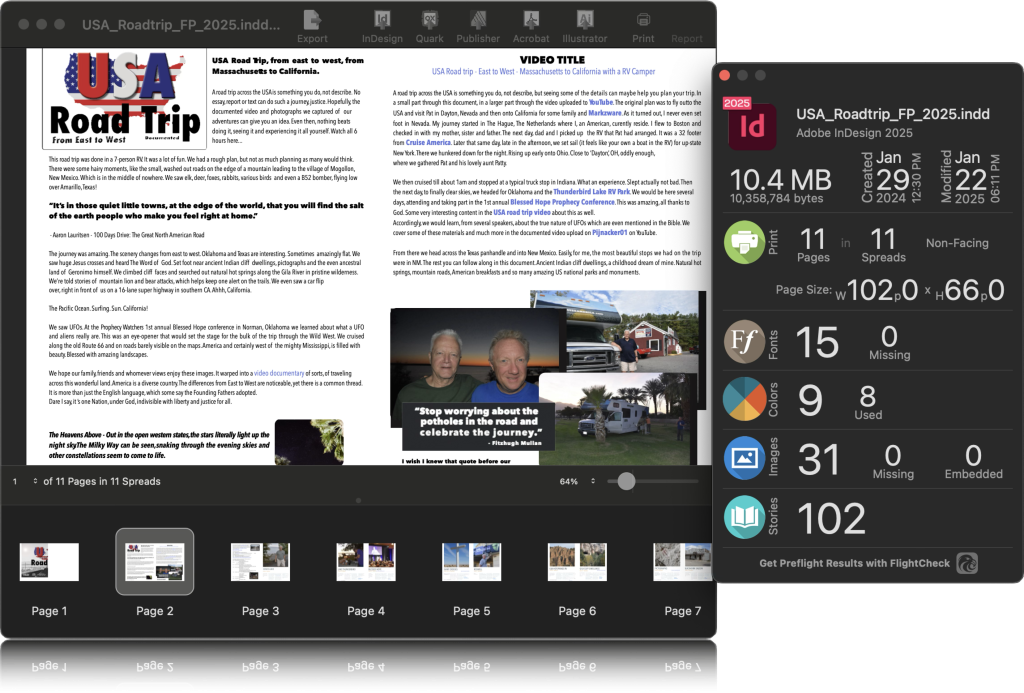
IDMarkz can preview InDesign and IDML files, allowing you to inspect document content without requiring Adobe InDesign. Previews are based on the internal document data, so there is no need to save files with embedded previews. The displayed preview is representative of the original document, with crisp, zoomable text and detailed page rendering for easy review.
[Buy, Get Quantity Discounts, or Try IDMarkz for macOS Now]

IDML


JPEG

PNG

TIFF

GIF

TXT

RTF

HTML
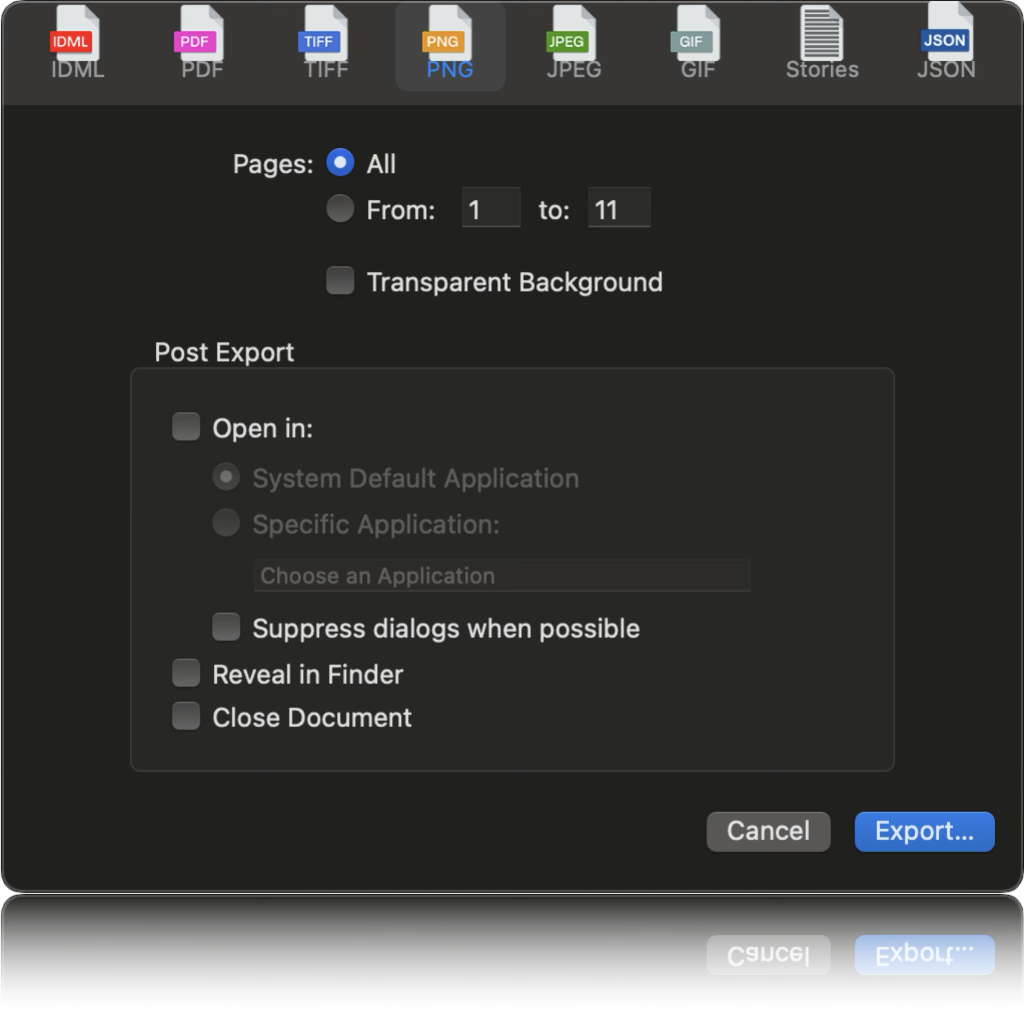
IDMarkz enables you to export InDesign files to numerous non-proprietary file types, including IDML, PDF, JPEG, PNG, TIFF, GIF, TXT, RTF and HTML. Open .INDD and .INDT (InDesign Template) files in an earlier version of InDesign or in another application! If you need to export to JSON, check out OmniMarkz!

IDMarkz is a cutting-edge solution that revolutionizes content extraction and conversion from unstructured formats. It empowers you to effortlessly extract and convert content from Adobe InDesign (INDD) and other unstructured formats into structured formats like JSON, XML, and IDML, unlocking the true value of your content.
IDMarkz allows you to extract InDesign text stories as RTF, HTML, or plain text (TXT), while preserving the original text formatting, making seamless conversion easier than ever.
Unlock new avenues for revenue growth by recycling your content for a competitive advantage. Leverage vector databases and large language models (LLMs) to streamline your workflow, making it more sustainable and efficient.

Export an InDesign file to high-quality PDF, via IDMarkz, without the Adobe InDesign application. Add annotations, markups, and comments, in Acrobat, and import the editing marks back into InDesign.
 Preview InDesign files
 No exporting No Open in … No annotatable PDFs Preview InDesign files Export as IDML, PDF, and more Open in QXP, Publisher, and more Export annotatable PDFs 12 months of updates included Preview InDesign files Export as IDML, PDF, and more Open in QXP, Publisher, and more Export annotatable PDFs Optional Upgrade charges may apply
Take me to IDMarkz SE for Windows
What is the difference between Perpetual and Subscription Licenses
[Take Me To The Products Page]
Further simplify the process, by configuring the Automation Preferences, to automatically export and open the file in your chosen application. Double click an INDD file in Finder and the document will open in QuarkXPress*, Affinity Publisher, InDesign CS6, or another application of your choice.
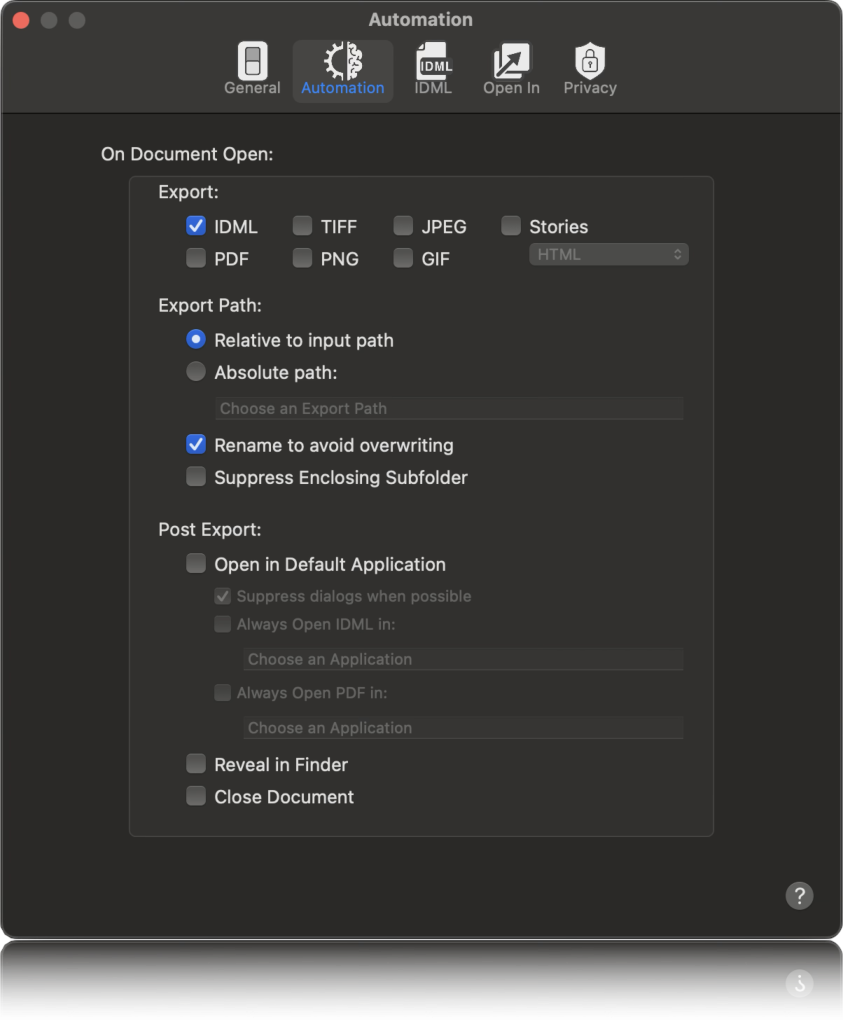

With Automation Preferences, AppleScript support and Custom URL Scheme, IDMarkz will have no problem integrating into most automation workflows.

[Buy, Get Quantity Discounts, or Try IDMarkz for macOS Now]
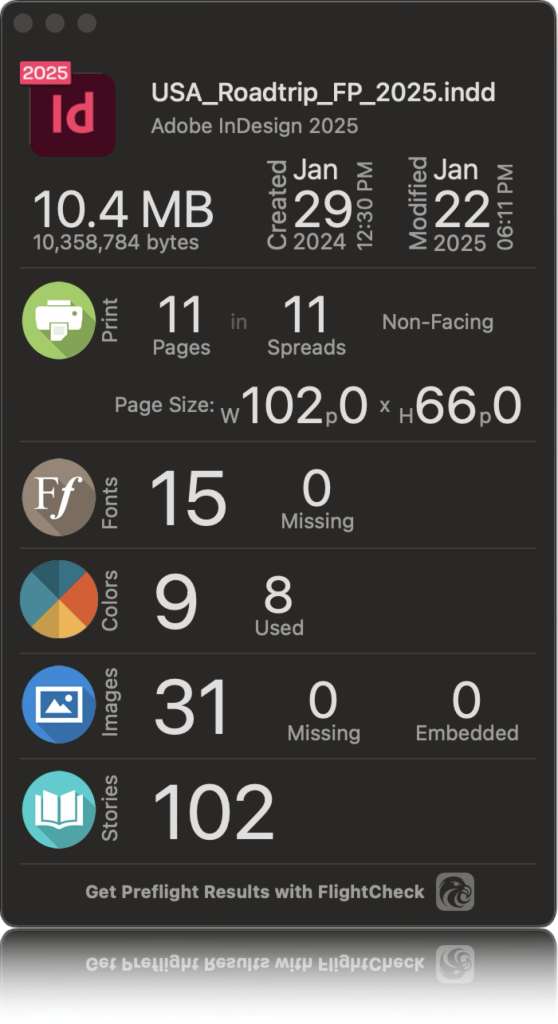
The document inspector gives a high-level document summary, with file type, version, size, creation date, modification date, page count, spread count, page size, font, color, and image data.
With over 30 years of software development experience in Desktop Publishing, Markzware offers a standalone file preview and conversion application, to help you more easily process files in today’s modern Desktop Publishing workflows.
[Buy, Get Quantity Discounts, or Try IDMarkz for macOS Now]

View document previews from any Finder window, with the push of the spacebar. This is a quick and easy method, to find the specific file you are looking for, if you do not remember exactly what you named it.

Optionally, turn on thumbnail previews, from the IDMarkz preferences, and view thumbnail previews, in any Finder window. This option will replace the default InDesign file icon with a preview of the first page of the document.
*requires macOS 10.15 or newer
We offer a download that allows you to use the IDMarkz preview feature, for free! This freebie is a great tool for viewing Adobe InDesign documents, at no cost. The exporting features can be enabled at any time with the purchase of a license.


IDMarkz is designed to make complex tasks quick and easy. Preview your document, then, with a single click, open the file in QuarkXPress*, Affinity Publisher, an older version of InDesign, other pre-defined applications, or define your own.



The applications Markzware provides designers of all levels are amazing time savers. When it comes to taking digital files and making them usable in older versions, or taking a file to your program of choice for editing there is no equal.
– Mark Lamhut, President,
Paul-Mark Printing

I recently purchased IDMARKZ because I am running an older Mac and found out I can no longer upgrade to the most recent versions of Adobe Cloud products without replacing my perfectly good iMac. I have started getting files in the higher version of InDesign, and I hated to have to go back to the customer to ask them to save it back a version if they didn’t include an .idml file when they packaged it. It’s a great product and I wish I had gotten it sooner!
– Vicki Bryant, Graphic Designer/Photographer/Owner,
V Bryant Graphic Design

Started using IDMarkz a few years ago. Best purchase made. Well worth it. Converts files to various Applications. Quark files to InDesign in seconds.
– Robert DeVitis, Owner,
Devitis Design
Submit your review | |
Without reservation, I can honestly say that the program IdMarkz literally saved my quite extensive sermon library from being lost.
I had used InDesign for many years, an excellent program, but far too expensive for the average desktop publisher like myself.
I discovered a brilliant program called ‘Affinity Publisher.’ It may not have the bells and whistles of InDesign, but it’s more than enough capable to run up books and magazines that won’t disappoint.
My problem came when I decided to switch over to Publisher. InDesign did not provide an easy export route for me to save thousands of sermon files I had composed. To tell the truth, I was a little bit in panic mode…even thinking of returning back to the expensive InDesign.
While trying to find a solution for my problem, I came across IDMarkz. It promised to restore my files back into a usable format by using Affinity Publisher. I bit the bullet, paid for and downloaded the IDMarkz program, and ‘Wallar!’ All the files I couldn’t convert all safely converted.
I can honestly say the IDMarkz has proved to be a godsend.
Markzware Hi, I’ll use it whilst browsing files in the finder/file open window within InDesign (I don’t really like using Adobe Bridge!) I use quick view everyday for jpgs, pdfs word files etc and it frustrates the [heck] out of me that Apple/Adobe don’t get this working for their apps - We used to purchase “Artview” from Codeline which did the same but their product doesn’t work with the latest OS/Creative Cloud versions - I used to use Markzware stuff years ago as we had a lot of crossover with Quark files etc but we only ever use inDesign now and don’t really need to convert files anymore. So pleased that I found this today though as I just had to trawl through hundreds of archived Indesign files looking for something specific - without quick view I would have had to open each one in turn!
Not only does IDMarkz convert newer InDesign files to IDML, it also exports files for Affinity Publisher. And with excellent fidelity. So glad I found this tool with the help of their excellent Customer Service, Technical support, and Sales teams.
The applications Markzware provides designers of all levels are amazing time savers. When it comes to taking digital files and making them usable in older versions, or taking a file to your program of choice for editing there is no equal.
Mark Lamhut, Paul-Mark Printing
While working on an InDesign document, the file started acting crazy and I could not get it to work properly. I contacted Markzware to see if they could help, and they bent over backward to accommodate my needs. I highly recommend IDMarkz!
Just discovered new magic in the form of IDMarkz. Now I can open, convert and use dozens of old InDesign files I didn't convert when I choose to not pay a monthly subscription/rent/ransom to Adobe and switched to the powerful Affinity suite of Publisher/Designer/Photo—highly, highly recommended, reasonably-priced, unexpectedly capable graphics tools for professionals. Bravo IDMarkz!
Wonderful tool, does everything I needed :-) Easy to download and easy to use. Thank you so much, this will make my life so much easier!
Markzware ROCKS!!!!
I'm obviously not the only one who is sick of being forced to work around Adobe's constant attempts to screw more cash out of users who have supported their products for DECADES already. Well, I would prefer to give my money and support to third-party software developers like Markzware, who are actually committed to providing products that HELP their customers. Their products are excellent, and the support is absolutely fantastic too.
Love it!
I recently purchased IDMARKZ because I am running an older Mac and found out I can no longer upgrade to the most recent versions of Adobe Cloud products without replacing my perfectly good iMac. I have started getting files in the higher version of InDesign, and I hated to have to go back to the customer to ask them to save it back a version if they didn't include an .idml file when they packaged it. It's a great product and I wish I had gotten it sooner!
Of course I switched to Affinity. Never think back. Affinity + @Markzware IDmarkz to convert Indesign files.

macOS • 27 Golden Gate | Hardware • Mac Pro, iMac, iMac Pro, MacBook, MacBook Pro, MacBook Air, Mac Mini |
*QuarkXPress 2017 or newer is required to open the exported IDML file. [Quark Press Release]

IDMarkz for macOS
(Adobe InDesign to QuarkXPress, Affinity Publisher,
older InDesign versions, Acrobat, Illustrator & More)

